Does Wi-Fi Calling Work in Airplane Mode? iPhone and Android Explained
Airplane mode can turn off cellular service while still allowing Wi-Fi to be switched back on. Learn when ordinary phone calls can work over Wi-Fi and why the mobile carrier's settings matter.
In this article
- Can You Make Phone Calls in Airplane Mode?
- How Airplane Mode and Wi-Fi Work Together
- How to Use Wi-Fi Calling in Airplane Mode on iPhone
- How to Use Wi-Fi Calling in Airplane Mode on Android
- Why Is Wi-Fi Calling Not Working in Airplane Mode?
- Do You Need a SIM Card or eSIM for Wi-Fi Calling?
- Can You Text in Airplane Mode With Wi-Fi?
- Does Wi-Fi Calling Work Without Cell Signal?
- Can You Use Wi-Fi Calling on an Airplane?
- Is Wi-Fi Calling Free?
- What Happens When Wi-Fi Disconnects?
- Can You Call 911 in Airplane Mode Using Wi-Fi Calling?
- Does Airplane Mode Save Battery While Using Wi-Fi Calling?
- Wi-Fi Calling vs. Internet Calling Apps
- Frequently Asked Questions
- The Bottom Line
Wi-Fi Calling can work in airplane mode when Wi-Fi is turned back on, the phone supports the feature, and the mobile carrier has activated Wi-Fi Calling for the line. Airplane mode normally disables cellular connectivity, but iPhone and many Android devices allow Wi-Fi to be enabled separately while airplane mode remains active.
This can be useful indoors, in areas with poor cellular coverage, or when a user wants to prevent ordinary cellular connectivity while maintaining an internet connection.
However, connecting to Wi-Fi does not automatically enable phone-number-based Wi-Fi Calling. The carrier must support the feature, the phone may need initial activation, and emergency calling restrictions must be understood.
Can You Make Phone Calls in Airplane Mode?
Ordinary phone calls can sometimes be made in airplane mode through carrier-supported Wi-Fi Calling. The phone must be connected to a functioning Wi-Fi network and the service must be active for the mobile line.
There is an important distinction between three types of calls:
Calling method | Can work in airplane mode with Wi-Fi? | Main requirement |
Carrier Wi-Fi Calling | Yes, when supported | Eligible cellular line and active feature |
FaceTime Audio | Yes | Internet connection and supported Apple setup |
WhatsApp, Signal or similar internet calling | Yes | Internet connection and app service |
Ordinary cellular voice calling without Wi-Fi Calling | Generally no | Cellular radio is disabled |
The fact that FaceTime or WhatsApp works does not prove that the carrier's Wi-Fi Calling feature is correctly configured.
Carrier Wi-Fi Calling allows calls through the ordinary phone number when the network and service support it.
How Airplane Mode and Wi-Fi Work Together
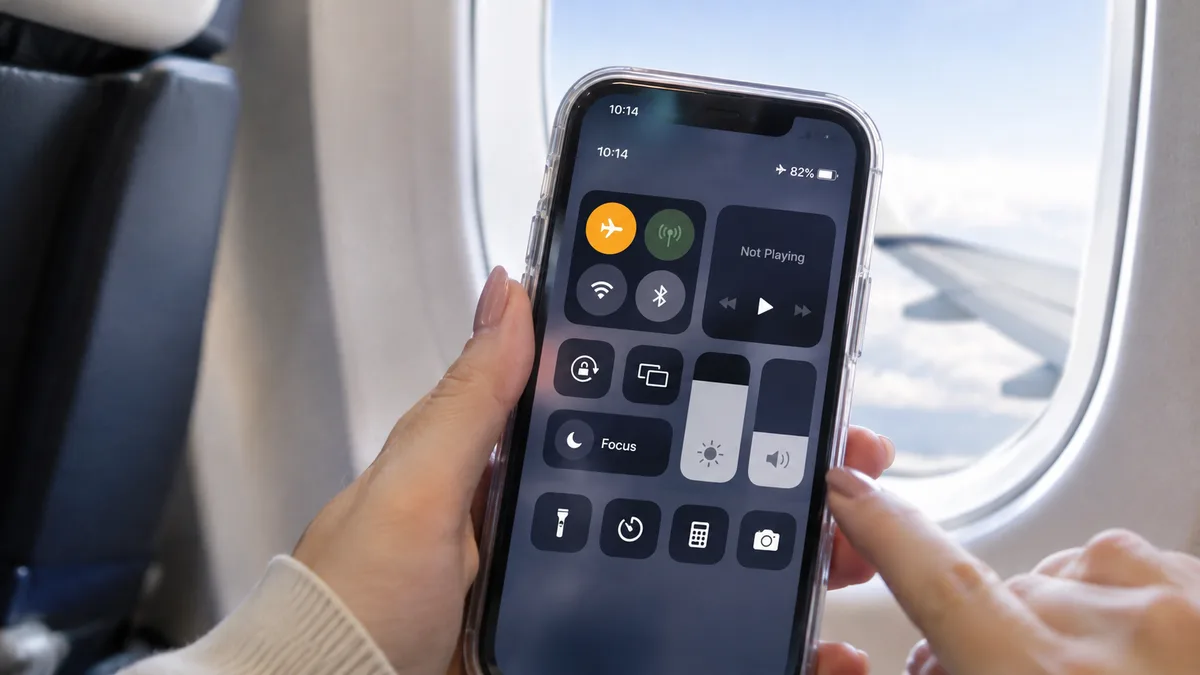
Airplane mode changes the phone's wireless connectivity settings. On an iPhone, Apple explains that Wi-Fi can be turned on again while airplane mode remains active.
Android devices commonly support similar behavior, although the exact settings and wireless controls depend on the manufacturer and software version.
This means a phone can show the airplane icon and still maintain an active Wi-Fi connection.
The Wi-Fi symbol by itself does not guarantee that carrier voice calls are being routed through Wi-Fi Calling.
How to Use Wi-Fi Calling in Airplane Mode on iPhone
An iPhone needs a compatible carrier, an active mobile line, and properly configured Wi-Fi Calling before the feature can work reliably.
Apple provides the following general activation path:
- Open Settings.
- Tap Cellular.
- Select the relevant line if the phone uses multiple SIMs.
- Tap Wi-Fi Calling.
- Turn on Wi-Fi Calling on This iPhone.
- Confirm the emergency services address or other information requested by the carrier.
- Connect to a reliable Wi-Fi network.
After the feature has been activated, enable Airplane Mode using Control Center and turn Wi-Fi on again if it was disabled.
Wait for the phone to connect to the network and for Wi-Fi Calling availability to be indicated where supported. Then make a normal non-emergency call to verify that the feature works.
The settings path can differ slightly across iOS versions and carrier configurations.
How to Use Wi-Fi Calling in Airplane Mode on Android
Android Wi-Fi Calling setup varies across Samsung, Google Pixel, Motorola, and other devices. The carrier must also provide support for the specific line and device.
A common approach is:
- Open Settings.
- Search for Wi-Fi Calling.
- Open the matching mobile network or calling setting.
- Enable the feature and complete any carrier activation prompts.
- Confirm or register the required emergency address.
- Connect to Wi-Fi.
- Enable Airplane Mode.
- Turn Wi-Fi on again.
- Place an ordinary test call.
Some Android devices offer a calling preference such as Wi-Fi preferred or Cellular preferred. Availability depends on the phone and carrier.
If the feature does not appear, check the carrier's device support documentation before assuming that a software update will add it.
Why Is Wi-Fi Calling Not Working in Airplane Mode?
Wi-Fi Calling may fail because the feature was not activated, the carrier does not support the device, Wi-Fi connectivity is inadequate, or the network blocks the service.
Common troubleshooting scenarios include:
Symptom | Possible cause | First action |
Wi-Fi works but ordinary calls fail | Wi-Fi Calling not active | Check carrier calling settings |
Wi-Fi Calling option is missing | Device or carrier unsupported | Confirm support with carrier |
Calls connect but drop | Unstable Wi-Fi | Test another reliable network |
Feature stopped working after an update | Settings or provisioning problem | Restart and check carrier configuration |
Calls work outside airplane mode only | Wi-Fi Calling not established | Recheck activation and Wi-Fi connection |
Emergency address error | Address not validated | Update E911 registration |
Apple recommends checking carrier support, restarting the phone, testing another Wi-Fi network, and confirming that Wi-Fi Calling is enabled.
A network settings reset may help in some cases, but it can remove saved network configurations. It should not be the first action before simpler checks.
Do You Need a SIM Card or eSIM for Wi-Fi Calling?
Carrier-based Wi-Fi Calling generally requires an eligible, active mobile line associated with a SIM or eSIM. It is still a service provided through the wireless carrier.
A phone without active mobile service may still use some internet-based calling apps over Wi-Fi, but that is different from making ordinary calls through a carrier-assigned phone number.
Some phones retain previously activated Wi-Fi Calling functionality under particular conditions, but users should not assume that a deactivated mobile plan will continue to provide the service.
Carrier provisioning requirements determine availability.
Can You Text in Airplane Mode With Wi-Fi?
Text messaging through Wi-Fi depends on the messaging technology, carrier support, and device settings.
Internet-based messaging apps can generally send messages over Wi-Fi as long as the service and internet connection work.
Carrier-supported SMS and MMS over Wi-Fi may work on eligible devices and networks, but compatibility varies. Features such as RCS and iMessage also have their own internet and registration requirements.
Sending an iMessage successfully does not demonstrate that all standard SMS messages will work without cellular service.
Does Wi-Fi Calling Work Without Cell Signal?
Wi-Fi Calling can provide ordinary phone service when cellular signal is weak or unavailable, provided the carrier supports the feature and the phone has a suitable internet connection.
Apple specifically describes Wi-Fi Calling as useful in places with little or no cellular coverage.
However, the service cannot be guaranteed everywhere. Certain Wi-Fi networks may restrict traffic or have performance problems that interrupt calls.
Users who depend on Wi-Fi Calling at home should verify their router and internet connection, particularly during power outages.
Can You Use Wi-Fi Calling on an Airplane?
Some aircraft provide passenger Wi-Fi, but that does not mean the airline permits voice calls. Airline rules, flight phase, onboard network restrictions, and applicable regulations determine which services may be used.
Apple advises travelers to use wireless settings consistent with airline requirements.
Even if the phone can technically connect and Wi-Fi Calling is available, passengers must follow the airline's instructions.
Do not assume that buying an onboard internet package includes permission to make ordinary voice calls during flight.
Is Wi-Fi Calling Free?
Many U.S. carriers include Wi-Fi Calling without a separate feature fee, but charges can depend on the plan, call destination, and location.
Verizon's terms, for example, distinguish calls to U.S. numbers from international calling, which may have different billing arrangements.
Wi-Fi Calling also uses the internet connection, and that connection can have its own costs or data limitations.
Before placing calls internationally, verify the wireless carrier's Wi-Fi Calling billing terms. A call over Wi-Fi is not necessarily treated as a free domestic call simply because no cellular tower is involved.
What Happens When Wi-Fi Disconnects?
If Wi-Fi connectivity is lost, a Wi-Fi call may drop. Some devices and networks support transferring an active call to eligible cellular service, but handoff depends on available technology and carrier settings.
When Airplane Mode is enabled, cellular service may not be available for an ordinary call handoff.
Therefore, losing Wi-Fi during an airplane-mode Wi-Fi call can end the conversation.
For important calls, use a stable network and understand the limitations of the current connection.
Can You Call 911 in Airplane Mode Using Wi-Fi Calling?
Emergency calling over Wi-Fi may be possible, but it has important limitations. The call may depend on carrier support, internet availability, and a registered emergency address.
Apple and Verizon explain that devices may attempt to use available cellular service first for emergency calls. If cellular service is unavailable, supported Wi-Fi Calling may route the call over Wi-Fi.
Verizon warns that an outdated registered address can affect how emergency services locate the caller. Internet outages or congestion can also interfere with the call.
Important precautions include:
- Keep the E911 address accurate.
- Tell the dispatcher the actual physical location when possible.
- Do not assume Wi-Fi Calling will remain available during a power outage.
- Do not use an ordinary test call to 911 to determine whether Wi-Fi Calling works.
- Follow the carrier's current emergency calling instructions.
A phone's ability to place ordinary Wi-Fi calls should not be treated as a guarantee of emergency call reliability.
Does Airplane Mode Save Battery While Using Wi-Fi Calling?
Airplane Mode can reduce certain cellular radio activity, but the actual battery effect depends on device settings, Wi-Fi signal quality, call duration, and other running services.
A phone using Wi-Fi continuously still consumes energy.
The battery benefit may be more noticeable in areas where the device would otherwise spend significant energy searching for cellular signal. However, there is no universal percentage of battery savings.
Users should prioritize reliable communication over theoretical energy savings when calling is important.
Wi-Fi Calling vs. Internet Calling Apps
Carrier Wi-Fi Calling and app-based internet calls provide overlapping capabilities, but they are not interchangeable.
Feature | Carrier Wi-Fi Calling | App-based internet calling |
Uses ordinary mobile number | Generally yes | Depends on app |
Needs mobile carrier support | Yes | Not necessarily |
Needs internet | Yes | Yes |
Can work in Airplane Mode with Wi-Fi | When supported | Usually |
Regular phone dialer | Generally yes | Often not |
Emergency calling | Carrier-specific | Not equivalent to standard emergency calling |
Recipient needs same app | Usually no | Often yes |
The right choice depends on whether the user needs ordinary telephone service or simply wants to communicate with someone using the same internet application.
Frequently Asked Questions
Does Airplane Mode turn off Wi-Fi Calling?
Airplane Mode may initially disable Wi-Fi, but Wi-Fi can often be turned back on. Carrier Wi-Fi Calling may then function if the service is properly activated.
Can you call without a SIM card in Airplane Mode?
Internet calling apps may work over Wi-Fi without an active mobile line. Ordinary carrier Wi-Fi Calling generally requires eligible mobile service.
Will Wi-Fi Calling use cellular minutes?
Billing and usage treatment depend on the carrier and plan. Check the provider's current terms.
Can Android make Wi-Fi calls in Airplane Mode?
Many compatible Android phones can, provided Wi-Fi is enabled, the carrier supports the service, and the feature is activated.
Why does FaceTime work but normal calls do not?
FaceTime uses internet calling, while ordinary phone-number Wi-Fi Calling requires carrier support and configuration.
The Bottom Line
Wi-Fi Calling can work in Airplane Mode on compatible iPhones and Android devices when Wi-Fi is re-enabled and the carrier's service is active. It is a practical option in areas with poor cellular coverage, but it is not guaranteed on every phone or network.
Before relying on the feature, test an ordinary call, confirm the carrier's support and pricing, and verify emergency address information. Wi-Fi Calling should be treated as an additional communication method, not a guaranteed replacement for every cellular or emergency service.
Spotted an error? Tell our editors. Read our corrections policy.