QR Code Scams: 7 Ways to Spot a Fake Code Before You Scan or Pay
A QR code on a parking meter, restaurant table, delivery notice, or unexpected package could lead to a fake payment page. Learn seven ways to recognize suspicious codes, verify URLs before opening them, and take the right steps if you entered a password or paid a scammer.
In this article
- How to Check a QR Code Before Scanning or Paying
- What Is a QR Code Scam and How Does It Work?
- The Most Common QR Code Scams in the United States
- How to Tell if a QR Code Is Fake: Warning Signs That Matter
- How to Check a QR Code Link Before Opening It
- How to Check QR Codes Safely on an iPhone
- How to Check QR Codes Safely on Android
- QR Code Payments: How to Verify the Merchant Before Sending Money
- What Happens if You Scan a Fake QR Code?
- What to Do if You Scanned a QR Code Scam
- Where to Report a QR Code Scam in the United States
- How to Protect Your Phone From QR Code Scams
- QR Code Scams at Work: How Businesses Can Reduce Risk
- QR Code Safety Myths That Can Create a False Sense of Security
- Quick QR Code Scam Checklist Before You Pay
- The Bottom Line: Verify the Destination, Not the QR Code's Appearance
- Frequently Asked Questions About QR Code Scams
A QR code scam uses a scannable code to redirect someone to a fraudulent website, payment request, or other malicious destination. The code may look completely ordinary, but scanning it can lead to a convincing imitation of a parking payment portal, delivery service, bank, or online account login.
The safest way to avoid a QR code scam is to inspect the destination before opening it and independently verify any request for money or personal information. A QR code is not proof that the website behind it belongs to the company whose name appears nearby.
Scammers have exploited QR codes on parking meters, in emails and text messages, and even inside unexpected packages. The Federal Trade Commission (FTC) specifically warned consumers about fraudulent parking payment codes in September 2026, while the FBI has issued warnings about QR codes used to steal financial information and deliver malicious software.
A suspicious QR code does not automatically mean a phone has been hacked. The greater risk usually begins when a person opens an unsafe destination, enters sensitive information, authorizes a payment, or installs malicious software.
How to Check a QR Code Before Scanning or Paying
To avoid a QR code scam, use the phone's built-in scanner to preview the destination, inspect the actual domain, and verify that the code belongs to the business requesting payment. If the destination cannot be confidently identified, use the company's independently verified website or app instead.
Seven checks can prevent many common QR-based attacks.
- Examine the physical code. Look for stickers placed over another code, unusual labels, peeling edges, or signs of tampering.
- Preview the URL before opening it. Use the camera's displayed link rather than automatically tapping through.
- Read the actual domain name. Watch for misspellings, extra words, misleading subdomains, and unfamiliar shortened links.
- Confirm the business independently. Check the official app, website, or contact information obtained from a trusted source.
- Question unexpected requests. A QR code demanding urgent account verification, password entry, or a small delivery fee deserves additional scrutiny.
- Verify the payment recipient and amount. A legitimate-looking page does not prove that money will reach the intended business.
- Stop if the page requests unusual access. Unnecessary app installations, device permissions, security-code requests, or demands to disable protections are warning signs.
These checks are especially important before paying for parking, entering banking information, or signing in to an account. If verification takes longer than expected, choosing another payment method is safer than rushing through an uncertain link.
What Is a QR Code Scam and How Does It Work?
A QR code scam is a form of digital fraud in which criminals use a machine-readable code to direct a person toward an unauthorized action. That action might involve visiting a phishing website, sending money to a fraudulent account, installing harmful software, or sharing personal information.
QR stands for Quick Response. The black-and-white square is a way to encode information, including website addresses, text, contact details, and certain payment instructions. QR technology itself is not inherently malicious.
The problem is that the printed image usually does not reveal its destination to a human observer. A legitimate-looking code can contain a link to a completely unrelated website.
How a Typical QR Code Scam Unfolds
Many QR code scams use familiar branding and an ordinary activity to make the victim less cautious.
A parking payment attack illustrates the sequence:
- A scammer prints a QR code linking to a fraudulent payment website.
- The scammer places the sticker over or near the legitimate parking operator's instructions.
- A driver scans the code, expecting to pay a parking fee.
- The phone displays a link that may resemble an official parking website.
- The driver opens the page and enters payment card information.
- The criminal receives the submitted information or collects the payment through an unauthorized account.
The victim may believe the transaction is complete, even though the parking operator has received nothing. In that situation, the driver could face both a financial loss and an unpaid parking charge.
A scammer does not need to hack the parking company's website to carry out this attack. Replacing the physical code or misleading the customer can be enough.
What Is Quishing?
Quishing is phishing carried out through QR codes. The term combines "QR" and "phishing" and describes attacks that use scannable codes to direct victims toward fraudulent websites or other malicious actions.
Traditional phishing often places a clickable link directly in a message. Quishing can replace that link with an image, which makes the destination less obvious until someone scans the code.
This technique can appear in emails, text messages, printed notices, social media posts, invoices, and workplace communications.
The Most Common QR Code Scams in the United States
A QR code scam becomes particularly convincing when the code appears in a place where people already expect to scan and pay. Parking facilities, delivery notices, restaurant tables, and event communications are familiar situations that scammers can imitate.
The following examples show how the risk differs by setting.
Scam scenario | What the code claims to do | Main risk | Safer alternative |
Parking meter or garage | Pay for parking | Stolen card details or payment to a scammer | Official parking app or verified payment machine |
Restaurant table | Open menu or pay bill | Fake payment page or phishing | Confirm the QR code with restaurant staff |
Delivery text or notice | Reschedule a package | Card theft or personal-data collection | Carrier's official app or tracking website |
Unexpected package | Identify sender or arrange return | Identity theft or malicious download | Do not scan; contact the marketplace directly |
Email from a supposed employer | Verify account or access documents | Stolen work credentials | Contact IT or the sender through a trusted channel |
Fake bank security notice | Restore account access | Password and security-code theft | Open the bank's official app |
Donation poster | Donate to a cause | Money sent to an impersonator | Verified charity website |
Payment app request | Send money to a merchant | Payment to the wrong recipient | Verify recipient inside the payment app |
Not every unusual code is fraudulent. The warning sign is the combination of an unverified destination and a request that could expose money, account access, or sensitive data.
1. Fake QR Codes on Parking Meters and Payment Signs
A parking meter QR code scam occurs when criminals redirect drivers to a payment system that is not operated by the actual parking provider. The code may appear on a sticker, a nearby sign, or a counterfeit parking notice.
The FTC's September 2026 consumer alert specifically describes reports of scammers placing their own QR codes over legitimate parking codes. A driver who scans the replacement code can land on a fraudulent website designed to steal payment information.
When paying for parking, check the operator's name, the payment instructions printed on the original equipment, and any established payment app. A sticker that appears recently applied or covers existing information deserves particular caution.
If the meter displays an unfamiliar website, do not assume the destination is legitimate simply because it appears on city property.
Safer choice: Use the parking provider's known app, a functioning payment terminal, or a verified website entered independently.
2. Restaurant QR Code Scams and Fake Online Menus
A restaurant QR code scam may involve a replacement menu link, counterfeit ordering page, or fraudulent payment request. Since QR menus are common, customers may be accustomed to opening links without carefully checking their destinations.
A code leading to a menu is not automatically dangerous. The concern increases when a basic menu request leads to a page demanding a credit card, account password, unnecessary app installation, or unrelated personal details.
A restaurant might legitimately support online ordering and payment, so context matters. If the requested action is unexpected, ask an employee to confirm the correct payment method or menu address.
Do not assume that a printed code is genuine merely because it is displayed on a table.
3. Package Delivery QR Code Scams
A delivery-related QR code scam typically claims that a package cannot be delivered until the recipient confirms an address or pays a small charge. The code may appear in a text message, email, printed notice, or counterfeit shipping document.
A fake page can imitate familiar delivery-service branding and ask for a credit card or personal information. The relatively small amount requested may encourage someone to pay quickly without checking the destination.
If a delivery notice seems legitimate, open the carrier's official website or app independently and enter the tracking number there. Avoid following a payment link simply because the message uses a recognizable company logo.
4. Unexpected Packages With QR Codes
An unsolicited package containing a QR code can be part of a variation of a brushing scam. The recipient might receive inexpensive merchandise and a note inviting them to scan the code to identify the sender or arrange a return.
The FBI's July 2025 advisory warned about unsolicited packages that use QR codes to direct recipients toward information theft or malicious software. The FTC also discussed this pattern in consumer alerts in January 2025 and August 2026.
A mystery package can create curiosity, which is exactly why the enclosed code may be effective.
If a package arrives unexpectedly, do not use its QR code to investigate the sender. Check any potentially connected shopping account through its official app and report suspicious account activity to the platform.
5. QR Codes in Emails and Workplace Messages
An email-based QR code scam can impersonate a company's IT department, a document-sharing platform, a benefits administrator, or a business partner. The message may claim that the recipient must scan a code to review a document or prevent an account from being disabled.
The goal is often credential theft. An attacker may attempt to obtain a work email password, a multi-factor authentication code, or permission to access a business account.
Employees should verify unusual requests through an existing internal communication channel. A message apparently sent by a supervisor or familiar vendor may still be compromised or impersonated.
6. Fake Payment App and Peer-to-Peer Transfer Codes
A payment-related QR code scam can direct money to an account controlled by someone other than the intended recipient. Unlike a conventional fraudulent checkout page, the code may open a genuine payment app with an unexpected recipient already selected.
This is an important distinction. A legitimate app does not guarantee that the recipient or payment purpose is legitimate.
Before approving a transfer, check the displayed recipient information, amount, and purpose. For a merchant payment, verify the correct recipient with the business using a trusted channel.
7. Fake Charity and Fundraising QR Codes
A charity QR code scam uses an emotional appeal to persuade people to send money without verifying the recipient. Criminals may imitate a nonprofit organization, disaster-relief campaign, school fundraiser, or community event.
Donation requests can be especially persuasive after emergencies, when people want to help quickly.
A safer approach is to find the organization's official website independently and review its donation instructions there. A QR code on a flyer or social media image should not be treated as proof that the donation reaches the named organization.
How to Tell if a QR Code Is Fake: Warning Signs That Matter
A fake QR code cannot reliably be identified by the pattern of black-and-white squares alone. Legitimate and malicious codes may look identical, and some fraudulent codes are printed cleanly on professional-looking signs.
Instead, look for evidence of tampering, a suspicious destination, and requests that do not fit the situation.
Physical Warning Signs
A QR code scam involving public signage may leave visible clues.
Watch for a sticker placed over another code, mismatched branding, unusual placement, overlapping labels, or an instruction sheet that looks inconsistent with the surrounding equipment.
However, a code printed directly onto a sign is not necessarily safe. Criminals can produce convincing printed materials, and even legitimate-looking communications may contain fraudulent links.
Digital Warning Signs
A suspicious QR destination may use an unfamiliar domain, a misleading subdomain, an unusual file download, or a shortened address that conceals the final website.
The page may also display urgent warnings, offer an implausible prize, or demand that the user act before checking the request.
Common suspicious messages include claims that a bank account will be frozen immediately, a delivery requires an unexpected payment, or a security code must be entered to prevent fraud.
Urgency is a reason to verify a request more carefully, not a reason to skip verification.
How to Check a QR Code Link Before Opening It
To check a QR code safely, scan it with a trusted phone feature, view the displayed destination, and decide whether the address belongs to the intended organization before proceeding. When the preview is unclear or incomplete, do not open it merely to find out where it goes.
A URL contains several components, but the registered domain is particularly important when evaluating whether a website is impersonating another company.
Understand the Difference Between a Domain and a Subdomain
A familiar brand name appearing somewhere in a URL does not make the website genuine. Attackers can place company names in subdomains, paths, or additional words to create a misleading impression.
The following examples use reserved demonstration domains and are not real payment destinations.
Example URL | What to notice |
https://payments.example.com/parking | example.com is the registered domain; payments is a subdomain |
https://example.com.account-check.example.net | The actual registered domain is example.net, not example.com |
https://example-payments.net | A separate domain that requires independent verification |
https://[email protected] | The address is directed to login.example.net; the text before @ can mislead |
https://example.com/parking | A simple path does not establish legitimacy without verifying the domain's owner |
These examples explain URL structure, not whether any particular real-world website is safe. A verified company may legitimately use several domains, and an apparently plausible domain may still be fraudulent.
Watch for Misspellings and Lookalike Domains
A QR code scam can rely on small changes to a familiar name. Attackers may substitute similar-looking letters, insert hyphens, add words such as "secure" or "verify," or use a different domain extension.
For example, a consumer expecting a major delivery company's website should not automatically trust a domain that contains that company's name with additional payment-related words.
The safest comparison is against an address independently obtained from the company's verified app, official correspondence, or a website already known to be legitimate.
Are Shortened QR Code Links Safe?
A shortened URL is not automatically malicious, but it hides the final destination and makes verification harder. Some legitimate businesses use redirects for analytics or marketing, which means a short link by itself does not establish fraud.
For payment and account-login requests, an opaque URL is a reason to use a verified alternative rather than experiment with the redirect.
Do not assume that a third-party link checker can guarantee safety. Some services may follow redirects or submit URLs to outside systems, potentially exposing private tokens or information embedded in the address.
Does HTTPS Mean the QR Code Is Safe?
No. HTTPS encrypts the connection between the browser and the website, but it does not establish that the website belongs to the organization it claims to represent.
Fraudulent websites can use HTTPS and display a normal browser connection indicator.
A secure connection is not the same as a trustworthy business. The actual destination, requested action, and independent verification remain important.
How to Check QR Codes Safely on an iPhone
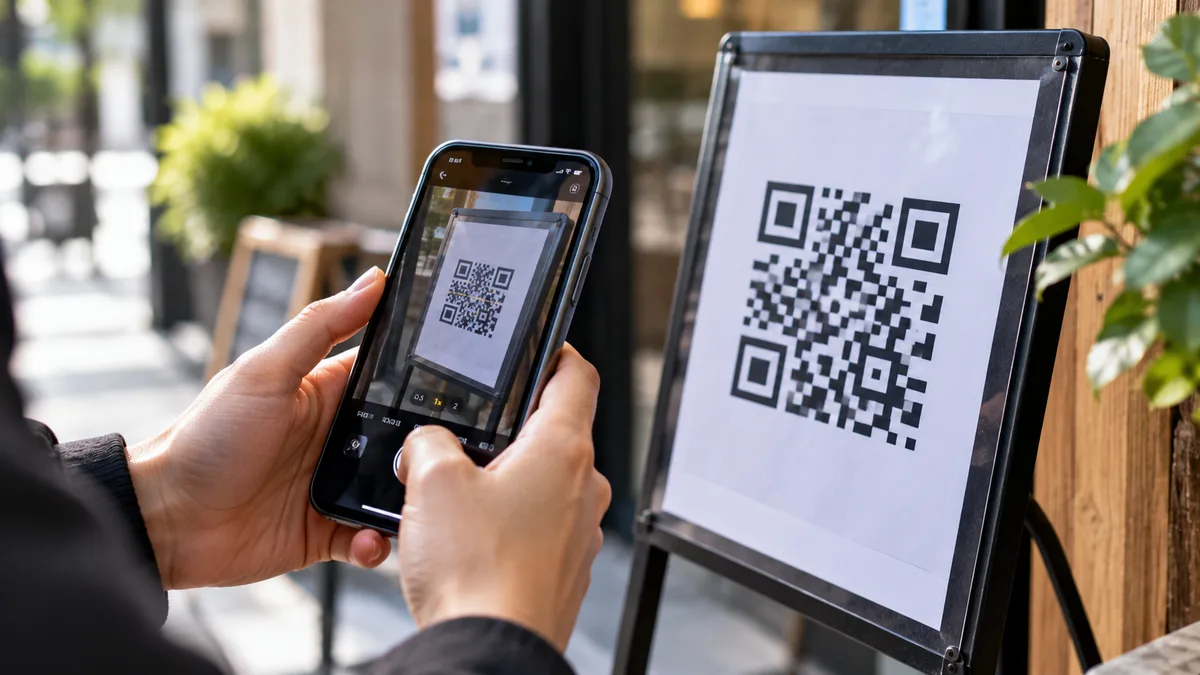
On an iPhone, the built-in Camera app can recognize a QR code and display a link before the user opens it. Apple also provides a Code Scanner feature on supported devices.
To reduce the risk of an iPhone QR code scam, use the displayed link as a checkpoint rather than automatically opening the page.
Step-by-Step iPhone QR Code Safety Check
- Open the Camera app. Use the built-in camera rather than installing an unfamiliar scanning app.
- Point the camera at the QR code. Allow the phone to recognize it without opening the destination.
- Read the displayed link. Check whether the visible address matches the organization you expect.
- Do not tap if the URL is suspicious or unclear. A truncated preview is not enough to establish that the destination is legitimate.
- Open a verified alternative. For sensitive transactions, use the organization's known website or official app.
The exact presentation can vary by iPhone model and iOS version. Apple's official QR scanning instructions describe the supported Camera and Code Scanner methods.
How to Check a QR Code in an iPhone Screenshot
When the QR code appears in an image, email, or saved screenshot, compatible iPhone features may recognize it within the photo. The available controls depend on the device and software version.
The safer approach is to inspect any recognized link without opening it, or use the business's official app instead.
Avoid sending screenshots that contain private account, authentication, or payment QR codes to an unknown third-party scanner. The code may contain sensitive information even when it appears to be an ordinary image.
How to Check QR Codes Safely on Android
Android phones commonly provide QR scanning through the Camera app, Google Lens, or a dedicated scanner in Quick Settings. The exact feature depends on the device manufacturer and Android version.
For an Android QR code scam check, the objective is the same as on an iPhone: inspect the destination and independently verify payment or account requests.
Step-by-Step Android QR Code Safety Check
- Open the built-in Camera app. Point it toward the code without selecting the displayed destination.
- Review the link preview. Check the actual domain and look for misleading spelling or unfamiliar addresses.
- Use Google Lens if needed. Supported Android devices can recognize QR codes through Lens.
- Avoid unnecessary downloads. A QR code requesting an unfamiliar APK file or unexpected software installation should not be trusted.
- Use a known payment or business app. Navigate independently when entering financial or account information.
Google's Pixel QR code instructions describe scanning with the Camera app, Google Lens, or Quick Settings. Other Android manufacturers may provide different interfaces.
Is a Separate QR Code Scanner App Necessary?
Most current iPhones and mainstream Android smartphones include QR scanning functionality, so a separate scanner usually is not needed for ordinary links.
Installing an unfamiliar scanning app can introduce additional privacy or security risks, especially if the app asks for unnecessary permissions.
When a specialized scanner is genuinely required, evaluate the developer, distribution source, permissions, and stated purpose before installing it.
QR Code Payments: How to Verify the Merchant Before Sending Money
The best protection against a QR code payment scam is to confirm the payment recipient through a trusted source before approving the transaction. Checking only the website appearance or the amount is insufficient.
A QR code might open a payment page, a bank website, a merchant app, or a person-to-person payment interface. Each requires slightly different verification.
Verify the Recipient, Amount, and Payment Method
Before confirming a QR-based payment, check three things:
- Recipient. Is the money going to the business or person you intended to pay?
- Amount. Does the amount match the posted price, invoice, or agreement?
- Purpose. Is the transaction consistent with the legitimate service, or does it introduce a new requirement?
For example, a parking page that unexpectedly asks for an account password or requests a transfer to an individual may not match the intended payment process.
If the app does not clearly identify the recipient, do not proceed until the business verifies the payment method.
Credit Card vs. Debit Card vs. Payment App
Different payment methods can provide different protections if fraud occurs. Unauthorized charges, scams in which the consumer willingly authorizes a transfer, and merchant disputes may be handled under different rules.
Payment method | Main concern | First action after suspected fraud |
Credit card | Fraudulent charge or stolen card details | Contact card issuer immediately |
Debit card | Unauthorized withdrawals from linked funds | Notify bank or credit union promptly |
Bank transfer | Money sent to an unintended recipient | Request immediate fraud review or recall |
Payment app | Transfer to a scammer or compromised recipient | Report within the app and contact linked financial institution |
Cryptocurrency | Transfers may be difficult or impossible to reverse | Contact the platform promptly and preserve records |
The availability of a refund or reversal depends on the circumstances, payment method, and applicable rules. A report should be filed promptly even when recovery is uncertain.
The FTC provides payment-specific recovery instructions in its guidance for people who were scammed.
What Happens if You Scan a Fake QR Code?
Scanning a fake QR code does not necessarily compromise a phone or expose a bank account. The consequences depend on what the code contains, whether the device opens its destination, and what the user does afterward.
A QR code is simply a way of encoding data. The dangerous action may involve opening a malicious link, submitting credentials, authorizing a payment, granting access, or installing software.
That distinction is essential for deciding how urgently to respond.
Risk by Action: What You Did After Scanning
The following table separates lower-risk situations from incidents that require immediate action.
What happened | Potential risk | Recommended response |
Camera recognized the code but no link was opened | Generally low | Do not open suspicious destination |
Suspicious page opened, but nothing was entered | Usually lower, but not zero | Close it, avoid downloads, update device |
Email address entered | Spam and targeted phishing | Watch for follow-up scams |
Username and password entered | Account takeover | Change password immediately from trusted site |
Authentication code entered | Account takeover or unauthorized sign-in | Secure account and contact provider |
Card details entered | Fraudulent charges | Contact issuer, monitor or replace card as advised |
Payment authorized | Financial loss | Contact payment provider immediately |
App installed or unusual permissions granted | Possible device compromise | Remove suspicious software and seek security assistance |
Simply viewing a page normally creates less risk than supplying credentials or installing an app, but it is not a guarantee of safety. Browser or operating-system vulnerabilities can occasionally be exploited without the user knowingly entering information.
Keeping the device updated helps reduce that risk.
What to Do if You Scanned a QR Code Scam
The correct response after a QR code scam depends on whether a person merely viewed the code, opened a suspicious website, submitted information, or transferred money. Acting quickly is especially important when credentials or payment details have been exposed.
If You Only Scanned the Code
If the camera recognized the QR code but you did not open the destination, no website may have been contacted at all.
Avoid opening the link, use a trusted alternative, and report suspicious physical signage to the business or property operator. No account reset is normally required solely because a camera recognized a code.
If You Opened a Suspicious Website
If a website opened but you did not provide personal information, download software, or authorize permissions, close the page and avoid interacting with it further.
Make sure the phone's operating system and browser are updated. Review unusual downloads, app installations, security prompts, and notifications, particularly if the page behaved unexpectedly.
If the device begins showing signs of compromise, seek help from the device manufacturer or a qualified security professional.
If You Entered Your Password
If a QR code scam led you to enter login credentials on a fraudulent page, change the password immediately using the legitimate company's website or app.
Take these actions in order:
- Open the genuine account independently. Do not use links from the suspicious page.
- Change the exposed password. Choose a unique password not used for other accounts.
- Secure any accounts sharing that password. Reused credentials can expose multiple services.
- Enable or review multi-factor authentication. Prefer phishing-resistant methods where available.
- Check active sessions and connected devices. Sign out unfamiliar sessions and revoke suspicious access.
- Review account recovery settings. Check email addresses, phone numbers, passkeys, and connected applications.
- Contact the provider if necessary. Report suspected account takeover or unauthorized changes.
For a business or workplace account, notify the organization's security or IT team as soon as possible. An attacker may attempt to use compromised credentials to reach other accounts or systems.
If You Entered Credit Card or Bank Information
If a QR code scam collected card or banking details, contact the financial institution immediately through its official app or a trusted phone number.
Explain what information was submitted and whether an unauthorized charge has appeared. The institution can advise whether to lock the card, replace it, dispute a transaction, or take additional measures.
Continue monitoring account activity even if no fraudulent transaction appears immediately.
If You Sent Money Through a Payment App
A completed payment can be harder to recover than an attempted charge, so report it immediately.
Contact the payment app and any connected bank or card issuer. Explain accurately whether the transaction was unauthorized or whether you were deceived into authorizing it, because that distinction can affect dispute rights.
Keep payment confirmations, transaction IDs, screenshots, messages, and details of the QR code destination. Do not pay someone who promises to recover the money for an advance fee.
If You Downloaded an App or File
If the QR code caused you to install an unexpected app, stop using the suspicious software and review the permissions it received. Use the device's trusted security tools and official app-management settings.
For Android, check installed applications, accessibility access, device administrator permissions, and settings that permit installation from unknown sources. For iPhone, review installed apps and any unfamiliar device-management profiles or VPN configurations.
If you suspect that credentials or sensitive data were exposed, secure the affected accounts from a different trusted device.
A factory reset may be appropriate in serious compromise cases, but it should not be treated as an automatic requirement after every QR scan. Seek qualified assistance if the device displays persistent suspicious behavior or the extent of compromise is unclear.
Where to Report a QR Code Scam in the United States
A QR code scam can be reported to the FTC or the FBI's Internet Crime Complaint Center. Financial losses should also be reported to the relevant bank, payment provider, or card issuer without waiting for a government complaint to be processed.
Use the following official resources.
Problem | Official resource | What it provides |
Consumer fraud or phishing | FTC fraud reporting | |
Online crime or financial cyberfraud | FBI Internet Crime Complaint Center | |
Identity theft | Personalized identity theft recovery guidance | |
Suspicious credit card transaction | Card issuer's verified support channel | Fraud review and dispute procedures |
Suspicious bank transfer | Bank or credit union's verified fraud department | Immediate account and transfer assistance |
Tampered parking or business QR code | Local operator or property manager | Removal and investigation of fraudulent signage |
Reporting does not guarantee recovery of lost money, but it can support investigations and help prevent other consumers from encountering the same scam.
When submitting a report, include the approximate date, location, website address, payment details, and any relevant messages or screenshots. Avoid reopening malicious pages solely to gather additional evidence.
How to Protect Your Phone From QR Code Scams
A QR code scam is easier to contain when a phone is updated, account access is protected, and suspicious links are not automatically trusted. Security settings cannot eliminate all fraud, but they reduce the consequences of a mistake.
Keep iOS or Android Updated
Operating-system and browser updates often include security fixes. Install updates promptly, especially when they address known vulnerabilities affecting web browsing or device permissions.
Use the phone's built-in update system rather than following update instructions displayed by an unfamiliar QR destination.
Use Unique Passwords and Strong Authentication
A unique password limits the damage if one account is compromised. A password manager can help users avoid entering credentials into unfamiliar websites and reduce password reuse.
Passkeys and security keys can provide stronger protection against many credential-phishing attacks where supported. Other forms of multi-factor authentication remain useful, but one-time codes can still be stolen if entered into a fraudulent page.
Be Careful With Permissions
A webpage or app that requests camera, location, notification, accessibility, or administrative access should have a legitimate reason for doing so.
For example, opening a restaurant menu normally should not require installing an unknown application with broad device permissions.
Deny unnecessary permissions and review those already granted to unfamiliar apps.
Do Not Automatically Trust Security Alerts
A fraudulent page may display a warning claiming that a phone is infected or that immediate technical support is required.
Do not call unfamiliar numbers, install remote-control apps, or provide payment information because a webpage displays an alarming security notice.
Use the device manufacturer's official support resources instead.
QR Code Scams at Work: How Businesses Can Reduce Risk
Businesses face QR code scams both as potential victims and as operators whose legitimate QR codes may be replaced or imitated. A tampered code can divert customer payments, damage trust, and generate complaints even when the business's own systems remain secure.
Preventing these problems requires physical checks, staff training, and reliable customer payment procedures.
Protect Customer-Facing QR Codes
Businesses using QR codes for parking, ordering, ticketing, check-in, or payment should regularly inspect physical displays. Particular attention should be given to public areas where stickers can be applied without employees noticing.
Important precautions include using consistent branded materials, minimizing unnecessary redirects, maintaining verified payment pages, and providing customers with another way to confirm the correct destination.
Tamper-evident labels may help reveal interference, but they do not guarantee authenticity.
Reduce QR Phishing in Employee Emails
Employees should be trained to treat QR codes in emails as potential links, not as inherently trusted images. A message requiring a QR scan to restore access to Microsoft 365, Google Workspace, payroll, or company benefits should be verified through established internal procedures.
Organizations can supplement training with phishing-resistant authentication, access controls, email filtering, and incident-response processes.
Security teams should also establish a simple way for employees to report suspicious messages without needing to interact with the encoded destination.
What Should a Business Do if Its QR Code Is Replaced?
A business that discovers a fraudulent QR code should remove or isolate the suspicious material, document it, and alert affected staff or customers through legitimate channels.
If payments may have been diverted, the business should investigate with its payment processor and follow applicable incident-response, reporting, and notification requirements.
Replacing the sticker alone may not be sufficient when customers have already entered passwords or payment information on a counterfeit page.
QR Code Safety Myths That Can Create a False Sense of Security
Avoiding a QR code scam requires understanding what QR codes and mobile browsers can actually do. Several common assumptions may encourage unnecessary risk or unnecessary panic.
Common belief | What is actually true |
All QR codes are dangerous | QR codes are a normal technology; risk depends on content and actions |
Scanning a code automatically hacks a phone | A scan alone generally does not compromise a device |
A padlock icon means the website is legitimate | HTTPS does not verify the business's identity |
A QR code on official-looking signage must be safe | Codes can be replaced or signs can be forged |
Opening a trusted payment app guarantees the recipient is legitimate | A genuine app can still be used to send money to a scammer |
An antivirus app can identify every dangerous QR link | No security tool guarantees detection of all fraud |
A small payment request is low risk | Small charges can expose card details or lead to further fraud |
The most reliable protection is independent verification when the code requests a payment, login, software installation, or sensitive information.
Quick QR Code Scam Checklist Before You Pay
Before making a QR-based payment, take a moment to confirm the destination and the transaction details. The same checklist can be used for restaurant ordering, parking, delivery notices, event tickets, and payment-app transfers.
- The QR code has no obvious signs of being covered or replaced.
- The code appears in a context where scanning is expected.
- The previewed URL matches a verified business destination.
- The registered domain is not a misleading lookalike.
- There is no unexpected pressure to act immediately.
- The page does not request unrelated passwords or security codes.
- The payment recipient and amount are correct.
- The page does not require an unfamiliar app or unnecessary permissions.
- An independently verified payment alternative is available if anything looks wrong.
A code that passes these checks is not guaranteed to be safe, but the process reduces exposure to common QR-based phishing and payment redirection attacks.
The Bottom Line: Verify the Destination, Not the QR Code's Appearance
A QR code scam succeeds when a familiar-looking square is treated as proof of trust. In reality, the code may conceal a fraudulent website, a different payment recipient, or a request to disclose sensitive account information.
The practical defense is straightforward: preview the destination, inspect the actual domain, and independently confirm any payment or login request that appears unusual. Use established apps and verified websites when the destination cannot be confidently identified.
If a suspicious QR code has already been opened, the next steps depend on what happened afterward. Merely scanning is different from submitting a password, providing card details, or authorizing a transfer.
When money or account access may be compromised, contact the financial institution or account provider immediately. Quick action can limit damage even when reversing a fraudulent transaction is not guaranteed.
Frequently Asked Questions About QR Code Scams
Can a QR code scam hack your phone?
A QR code scam can direct a phone to malicious content, but scanning the code alone does not normally hack the device. Risk increases if the user opens an exploit-bearing page, installs malicious software, grants dangerous permissions, or enters sensitive information.
How can you tell if a QR code is a scam?
Check the physical code for tampering, preview the destination URL, inspect the registered domain, and verify unexpected requests through a trusted source. A fake QR code may look exactly like a legitimate one, so appearance alone is not enough.
Is it safe to scan QR codes with an iPhone?
An iPhone's built-in QR scanning features can display a destination before it is opened. The main precaution is to avoid opening suspicious links or providing credentials and payment information on unverified websites. Keeping iOS updated also improves security.
How do you check a QR code on Android before opening it?
Use the Camera app, Google Lens, or a supported built-in QR scanner to display the link. Inspect the destination before selecting it, and use an independently verified website or app for sensitive transactions.
Can QR codes steal credit card information?
A malicious QR code can lead to a fraudulent payment page that collects credit card information entered by the victim. Some codes may also redirect payments to unauthorized recipients. A QR code generally does not extract a stored card number merely because the camera reads it.
What should you do if you scanned a suspicious QR code but did not click anything?
If you only scanned the code and did not open its destination, the risk is generally low. Avoid opening the suspicious link and use an independently verified destination if you need to complete the transaction.
Can you get a virus just by opening a QR code link?
Opening a malicious page can sometimes expose a device to browser or operating-system vulnerabilities, but a website visit does not automatically mean malware was installed. Keeping devices updated and avoiding suspicious downloads reduces the risk.
Are QR codes on parking meters safe?
Many parking operators use legitimate QR codes, but scammers have been reported replacing them with fraudulent stickers. Inspect the code, verify the parking provider, and prefer its official app or a trusted payment method when possible.
Can a QR code take money from your bank account automatically?
Scanning a code does not ordinarily authorize a withdrawal by itself. A scam may instead trick the user into approving a payment, entering banking credentials, or granting access that later enables theft.
What is a quishing attack?
Quishing is phishing that uses QR codes to deliver fraudulent links or initiate malicious actions. It commonly appears in emails, payment signs, text messages, and other communications that encourage the recipient to scan a code.
Can a QR code scam happen through email?
Yes. Fraudulent emails can contain QR code images that lead to fake sign-in pages or other malicious destinations. Employees and consumers should independently verify account requests rather than scanning unexpected codes.
Where should a QR code scam be reported?
Report consumer fraud to the FTC at ReportFraud.ftc.gov and internet crime to the FBI at IC3.gov. If money was sent or financial information was exposed, notify the bank, card issuer, or payment app immediately.
Can money stolen through a QR code scam be recovered?
Recovery may be possible depending on the payment method, transaction circumstances, and applicable protections. Contact the financial institution or payment provider immediately and request a fraud investigation or reversal. Recovery is not guaranteed.
Are QR code checker websites reliable?
Some security services can flag known malicious URLs, but none can guarantee that a code or website is safe. A checker may also send the URL to a third party, which creates privacy concerns for private account or authentication links. Independent verification remains essential.
Should you scan a QR code on an unexpected package?
No. An unexpected package containing a QR code can be part of a fraud scheme designed to collect information or prompt a harmful download. The FTC and FBI have warned about this tactic. Use official shopping-account channels to investigate instead.
Can a QR code that worked before become unsafe later?
Yes. Some QR codes use dynamic links or redirect services whose destinations can change, while a legitimate website can later be compromised. Past successful use is not a permanent guarantee of safety.
Spotted an error? Tell our editors. Read our corrections policy.