What to Do if Your Phone Is Lost or Stolen: Protect Your Data Before It's Too Late
A missing smartphone can expose far more than photos and contacts. Follow this practical emergency guide to locate and lock your iPhone or Android, protect banking apps, secure your phone number and decide when a remote wipe is necessary.
In this article
- What to Do if Your Phone Is Stolen: The First 10 Minutes
- How to Find and Lock a Lost iPhone
- How to Find and Secure a Lost Android Phone
- Should You Remotely Erase a Stolen Phone?
- How to Block a Stolen SIM Card or eSIM
- How to Protect Banking Apps, Email and Payment Accounts
- How to Report a Stolen Phone to Police and Your Carrier
- What If Your Phone Is Offline or Has No Battery?
- How to Prepare Your Next Phone Before It Goes Missing
- What to Do if Your Phone Is Stolen FAQ
- The Bottom Line
Knowing what to do if your phone is stolen starts with securing the device remotely, protecting your mobile number and checking the accounts that may be accessible through it. An iPhone or Android phone can contain email, banking apps, saved passwords, private messages and authentication codes. The first priority is protecting your identity and financial accounts, not physically recovering the phone at any cost.
The best response depends on whether the device is simply misplaced, appears in an unfamiliar location or has disappeared during a suspected theft. Apple offers Find My and Lost Mode, while Google provides Find Hub to locate, lock or erase eligible Android devices. Both systems require certain settings to have been enabled beforehand, and neither guarantees that a disconnected device can be located immediately.
This guide explains what to do if your phone is stolen, including the first actions, separate instructions for iPhone and Android, SIM and eSIM protection, bank-account security and the consequences of wiping a device remotely.
What to Do if Your Phone Is Stolen: The First 10 Minutes
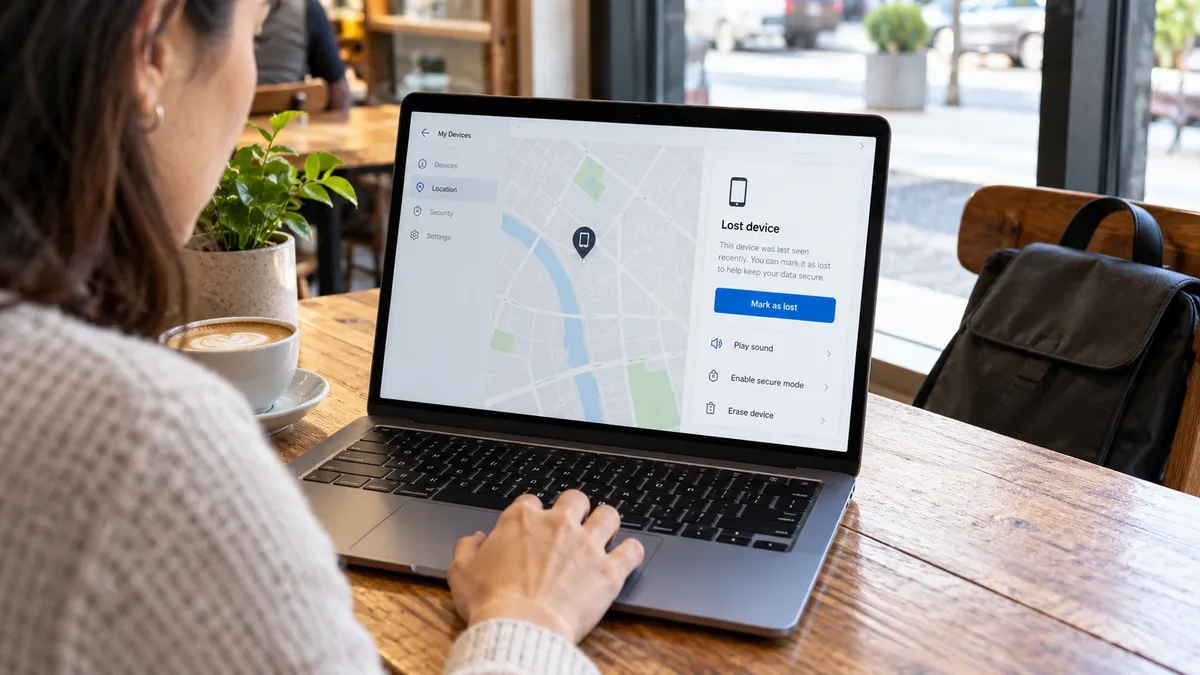
The first stage of what to do if your phone is stolen is to establish whether the phone may still be nearby and then secure it without increasing your personal risk. Use another trusted device to access the official location service and check the last known position. If the location suggests theft or an unsafe situation, do not travel there to confront anyone.
A sensible response should follow a clear sequence. Some actions can be completed from a computer or another phone, while others require the mobile carrier or financial institution. The order matters because an attacker who controls the phone number or an unlocked device may attempt to change account credentials.
Priority | Immediate action | Purpose |
1 | Open Apple Find My or Google Find Hub | Check location and available controls |
2 | Activate Lost Mode or Mark as lost | Restrict access to the device |
3 | Contact the mobile carrier | Secure SIM/eSIM and prevent unauthorized transfers |
4 | Review banking and primary email accounts | Detect unauthorized access |
5 | Change compromised credentials | Protect connected accounts |
6 | Preserve device identifiers and evidence | Support theft reports or insurance claims |
Expert takeaway: The first decisions about what to do if your phone is stolen should limit the attacker's access to information. Calling the lost number repeatedly is less important than locking the device and protecting the accounts that can authorize payments or password resets. If a device was unlocked when it disappeared, treat the situation as more urgent.
How to Find and Lock a Lost iPhone
For an iPhone, what to do if your phone is stolen begins with Apple's Find My service. Open the Find My app on another trusted Apple device or use the official Find Devices service at iCloud.com/find. Sign in using the Apple Account associated with the missing phone and select the affected device.
If Find My was enabled before the phone disappeared, you may be able to see its current or last known location, play a sound or mark it as lost. Apple states that Lost Mode helps secure supported devices and can suspend eligible payment cards and services. The device's connection status and security settings affect when commands take effect.
How to activate Lost Mode on an iPhone
Lost Mode is a key part of what to do if your phone is stolen because it restricts access and allows a message to appear on the device. Use contact information that does not expose unnecessary personal details, such as a trusted alternative number. Do not place your home address or sensitive financial information in the recovery message.
- Open Find My or the official iCloud Find Devices page.
- Select the missing iPhone from the device list.
- Choose the available Lost Mode or Mark as Lost option.
- Follow the instructions to display a recovery message and safe contact method.
- Confirm that the request is active or pending and monitor the device's status.
Expert takeaway: Knowing what to do if your phone is stolen does not require immediately erasing the iPhone. Lost Mode offers a protective first step while preserving the possibility of locating the device. If the phone is offline, some commands may remain pending until it reconnects.
Should you remove a stolen iPhone from your Apple Account?
Understanding what to do if your phone is stolen includes knowing what not to do. Do not remove the device from Find My merely because someone sends a message claiming it must be removed before they can return it. Removing a device may affect Activation Lock and protections intended to discourage unauthorized reuse.
Apple also warns users about phishing messages impersonating recovery notices. A thief may attempt to obtain the Apple Account password, passcode or verification code by claiming the device has been found. Use official Apple services rather than links supplied by unknown callers or texts.
How to Find and Secure a Lost Android Phone
On Android, what to do if your phone is stolen begins with Google Find Hub, accessible through the official android.com/find website or supported Find Hub applications. Sign in with the Google Account associated with the device and select the missing phone. Available actions may include viewing its location, playing a sound, marking it as lost or performing a factory reset.
Google explains that remote functions depend on factors such as power, network access, account status and whether the relevant device-finding settings are enabled. The location displayed may be an estimate or a last known position rather than a real-time confirmed location. A device that appears offline is not automatically permanently lost.
How to mark an Android phone as lost
The Android process for what to do if your phone is stolen is designed to restrict access while allowing recovery information to be shown. Google's interface can differ by Android version and device manufacturer, so follow the official current options visible for your device. Do not assume every Samsung, Pixel or other Android phone uses identical menu labels.
- Open Google Find Hub using a trusted browser or another supported device.
- Sign in to the Google Account linked to the missing phone.
- Select the device and review its current or last known location.
- Choose Mark as lost or the corresponding security option.
- Add a limited recovery message and alternate contact method.
- Check whether the action is completed or awaiting reconnection.
Expert takeaway: What to do if your phone is stolen on Android is broadly similar to the iPhone response, but device-finding capabilities depend on configuration. Security tools cannot be assumed to work when the phone was never associated with the account or required settings were disabled. Protecting the Google Account remains essential regardless of the location result.
Should You Remotely Erase a Stolen Phone?
Deciding whether to erase the device is one of the most consequential parts of what to do if your phone is stolen. Remote erasure can reduce the exposure of personal data when recovery is unlikely or sensitive information is at significant risk. However, wiping is generally a more permanent step than locking and can limit subsequent device-location capabilities.
Google specifically warns that factory resetting a lost Android phone can remove it from Find Hub, potentially ending its visibility through that system. Apple has its own remote-erasure behavior and Activation Lock considerations. Review the official platform instructions before choosing a wipe, particularly when the phone may simply be inside your home or workplace.
If the phone was unlocked during the theft, what to do if your phone is stolen may require faster action than in a case involving a strong passcode and protected accounts. Notify relevant financial institutions and change critical passwords from a clean trusted device. A remote wipe command does not eliminate the need to investigate activity that occurred before it executed.
How to Block a Stolen SIM Card or eSIM
Protecting your mobile number is a critical component of what to do if your phone is stolen because the number may receive account-recovery texts and security codes. Contact your carrier through its verified website, customer-support number or retail location. Explain whether the physical phone, SIM card or eSIM-capable device was lost and ask the company to secure the line against unauthorized changes.
A carrier may suspend service, issue a replacement SIM/eSIM and offer account PINs or transfer restrictions. The available controls and identity-verification requirements differ between carriers. Ask specifically whether a number-transfer lock or additional security measure can prevent a criminal from moving your number to another account.
Knowing what to do if your phone is stolen also means considering the difference between ordinary device theft and SIM swapping. In a SIM-swap attack, the criminal may transfer the victim's number without physically possessing the phone. Unexpected loss of mobile service, especially while the handset is still present, should trigger contact with the carrier and immediate review of important accounts.
How to Protect Banking Apps, Email and Payment Accounts
A lost device creates account-related risks that extend beyond the hardware itself. The most important part of what to do if your phone is stolen is reviewing the primary email account, banking applications, saved payment cards and password manager. A criminal who gains access to a primary inbox may use password-reset messages to compromise other accounts.
Prioritize accounts according to their ability to authorize financial transfers or reset passwords. Sign out of unfamiliar sessions, change potentially compromised passwords and review security notifications. If unauthorized financial transactions appear, report them immediately using the bank or card issuer's official process.
Account type | What to check | Possible protective action |
Main email | Recovery details, recent sign-ins, forwarding rules | Change credentials and revoke suspicious sessions |
Bank and credit cards | Transfers, purchases, linked devices | Report fraud and restrict access |
Apple or Google Account | Active devices and security events | Secure credentials and review recovery options |
Password manager | Account access and authentication methods | Review sessions and strengthen protection |
Messaging applications | Linked sessions and suspicious messages | Revoke unauthorized connections |
Mobile carrier | SIM/eSIM changes and transfer requests | Add appropriate security restrictions |
Expert takeaway: What to do if your phone is stolen depends heavily on whether the thief can unlock it. If the device had a strong passcode and remote locking was successful, exposure may be more limited, but it should not be assumed absent. Check account activity rather than treating a lost-device notification as proof that no data was accessed.
How to Report a Stolen Phone to Police and Your Carrier
Reporting theft is an important later step in what to do if your phone is stolen, particularly when you need insurance documentation or have evidence of criminal activity. Contact the appropriate local law-enforcement agency and supply the device model, approximate location, date, circumstances and identifying information. Keep the report or incident number for later use.
Your device's IMEI may help identify the handset to a mobile carrier. It can often be found in original purchase records, packaging, account documentation or a device-management interface. Do not post the IMEI publicly, and do not assume it provides a consumer-accessible live tracking service.
If you purchased mobile-device insurance, what to do if your phone is stolen includes checking the deductible, claim deadline, covered events and replacement conditions. Carrier programs, manufacturer coverage and credit-card purchase protections can differ significantly. A police report may be requested, but not every insurer requires the same documents.
What If Your Phone Is Offline or Has No Battery?
A major limitation of what to do if your phone is stolen is that remote tools cannot guarantee immediate location information. The phone may be powered off, disconnected from the network or unable to communicate. Depending on the platform and configuration, a previously recorded location may still be available.
Keep the remote lock or recovery request active when appropriate and secure associated accounts while awaiting a status change. Do not repeatedly travel to uncertain map coordinates or confront anyone who might possess the device. Location estimates are technical clues, not proof that a particular individual committed theft.
What to do if your phone is stolen remains a security task even when location tracking fails. The carrier can help secure the number, account providers can restrict suspicious activity and a police report can document the incident. These protections do not depend on obtaining a precise map location.
How to Prepare Your Next Phone Before It Goes Missing
Learning what to do if your phone is stolen is more useful when it leads to preventive changes before another incident. Enable the official device-finding system, use a strong device passcode, maintain automatic backups and secure account recovery methods. Avoid keeping unprotected photographs of identification documents or lists of passwords in easily accessible locations.
For an iPhone, review Find My, Activation Lock and available stolen-device security settings. For Android, confirm Find Hub, screen-lock protection and account recovery methods. Some settings must be enabled before the device disappears, so a preventive check is more effective than trying to activate them afterward.
A practical phone-security checklist should include the following measures. Each reduces a different part of the risk and should be checked after changing devices. No single setting guarantees immunity from theft or account takeover.
- Enable Find My or Google Find Hub.
- Use a strong passcode and appropriate biometric protection.
- Turn on automatic device and app updates.
- Maintain tested cloud or local backups.
- Add stronger authentication to email, banking and important accounts.
- Set a carrier account PIN or other transfer protection.
- Keep the device's serial number or IMEI in a secure record.
- Review the process for remotely signing out of accounts.
Expert takeaway: The best answer to what to do if your phone is stolen includes measures taken before the theft. Restorable backups, secure account recovery and enabled remote-lock features can reduce both financial losses and the time required to recover. Device security should be treated as a routine personal-finance and privacy habit.
What to Do if Your Phone Is Stolen FAQ
Can someone access your bank account with a stolen phone?
A stolen phone does not automatically give someone access to banking apps, but an unlocked device or compromised credentials can increase the risk. What to do if your phone is stolen includes notifying financial institutions, reviewing transactions and securing authentication methods. Report suspected unauthorized transfers immediately rather than waiting for the device to be recovered.
Can you find a stolen phone if it is turned off?
Some devices may display a last known location or support additional offline-finding capabilities when previously configured. However, what to do if your phone is stolen should not depend on guaranteed real-time tracking. Secure the accounts and carrier line even when the location service cannot connect.
Should you change your passwords after losing a phone?
Changing critical credentials is appropriate when there is evidence of compromise or a reasonable risk that the device was accessible. What to do if your phone is stolen also includes reviewing account sessions and recovery methods. Start with the main email, Apple or Google Account and financial services.
Does remote erasing remove everything from a phone?
Remote erasure can delete local data when the device receives and executes the command, but its scope and limitations vary. What to do if your phone is stolen should include checking cloud backups, SD-card behavior and whether previously accessed information could already have been copied. Erasure is not a substitute for securing connected accounts.
Can a carrier block a stolen phone?
Carriers may suspend a line, restrict service, transfer the number to a replacement SIM and use available device-identification measures. What to do if your phone is stolen includes contacting the carrier promptly and asking which protections it can apply. The carrier's ability to block particular devices or network access varies.
The Bottom Line
What to do if your phone is stolen comes down to four priorities: remotely secure the device, protect the phone number, review connected accounts and document the theft. Apple Find My and Google Find Hub provide important tools, but their availability depends on settings and connectivity. Remote erasure may be appropriate when personal data is at serious risk, though it requires considering the recovery consequences.
Do not risk personal safety to retrieve a phone from an unfamiliar location. Secure financial accounts and recovery methods first, then coordinate with the carrier, police and insurer where appropriate. The sooner these steps begin, the better the opportunity to limit damage beyond the cost of the missing device.
Spotted an error? Tell our editors. Read our corrections policy.